agent ·
OpenHands
🙌 OpenHands: AI-Driven Development

Agent Canvas
The self-hosted developer control center for coding agents and automations.
Run OpenHands, Claude Code, Codex, Gemini, Pi, OpenCode, or any ACP-compatible agent across local, remote, and cloud backends.




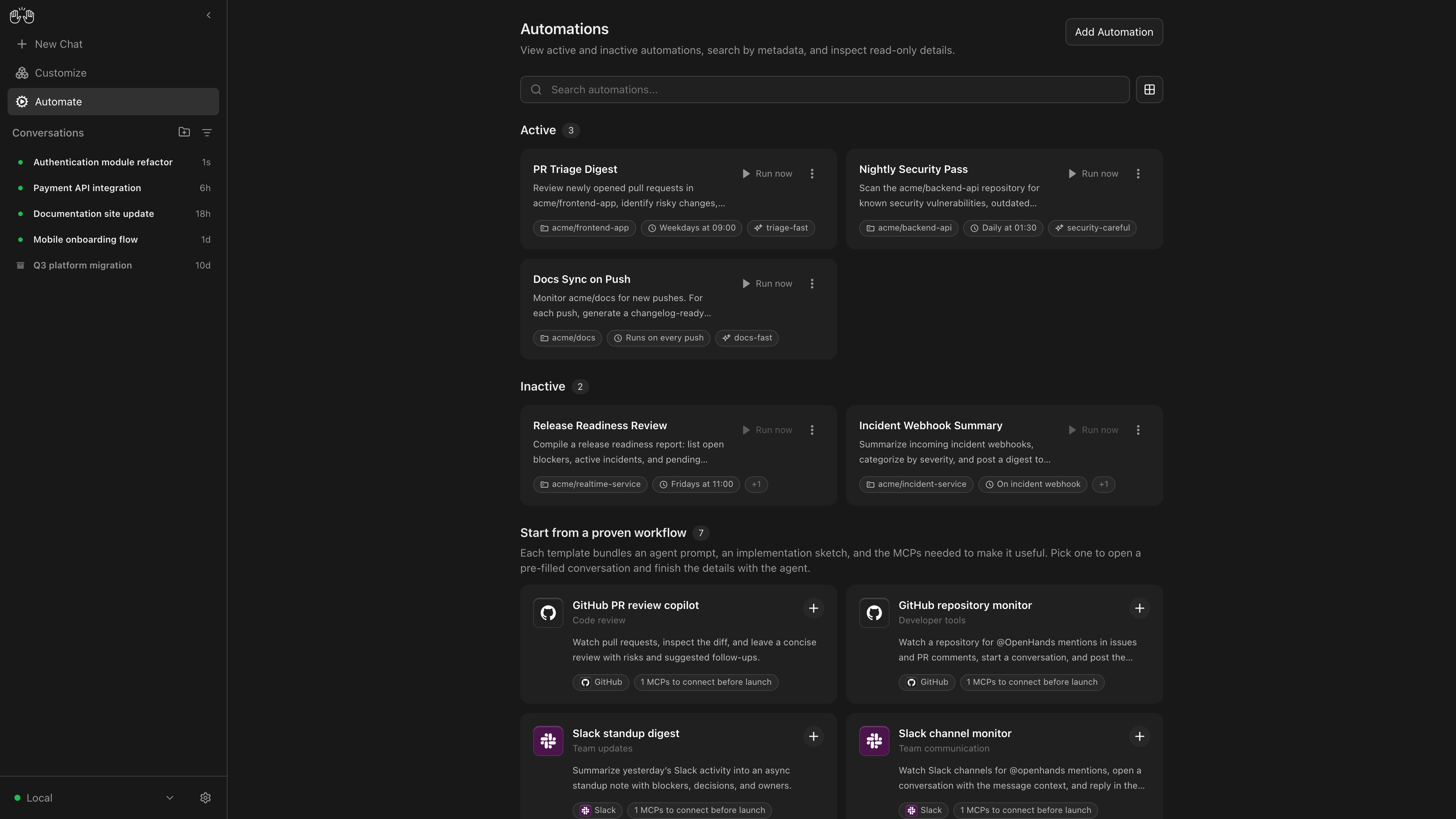
OpenHands Agent Canvas turns your coding agents into a self-hosted, always-on engineering team. It's a developer control center for starting conversations and automating everyday tasks — like generating reports that publish to Slack or automatically decomposing GitHub issues into tasks. It runs locally on your machine by default, but can connect to multiple “agent backends”, e.g. running agents in Docker containers, on VMs, or within your company infrastructure. You can optionally choose to run agents on OpenHands Cloud or OpenHands Enterprise infrastructure. Agent Canvas runs the open source OpenHands agent out-of-the-box, but can use third-party agents such as Claude Code, Codex, Gemini CLI, Pi, and OpenCode. | | | | -------------------------------------------------------------------------------------------------------------------- | ---------------------------------------------------------------------------------------------------------------------------------------- | | [**Self-host your way**](https://docs.openhands.dev/openhands/usage/agent-canvas/backend-setup/vm) | Run agents locally, in Docker, on VMs, or anywhere you can run an agent server backend | | [**Switch between different backends**](https://docs.openhands.dev/openhands/usage/agent-canvas/backends) | Switch between local, remote, and cloud agents without losing focus | | [**Create automations**](https://docs.openhands.dev/openhands/usage/agent-canvas/prebuilt-automations) | Create automations and workflows that integrate with Slack, GitHub, Linear, and more. Run on a schedule or in response to webhook events | | [**Integrate with the tools you use**](https://docs.openhands.dev/openhands/usage/agent-canvas/prebuilt-automations) | Connect your automations with third-party services like Slack, GitHub, Notion, and more to automate workflows | | [**Bring your own model**](https://docs.openhands.dev/openhands/usage/settings/llm-settings#llm-profiles) | Use with any LLM | | [**Use with any agent**](https://docs.openhands.dev/openhands/usage/agent-canvas/acp-agents) | Use with OpenHands, Claude Code, Codex, Gemini, Pi, OpenCode, or any agent with Agent-Client Protocol (ACP). | If you have questions or feedback, please open a GitHub issue or join the [#proj-agent-canvas channel in Slack](https://openhands.dev/joinslack). ## Quickstart You can install OpenHands to run agents on any machine: on your laptop, on a dedicated computer like a Mac Mini, or on a server in the cloud. The most powerful way to run OpenHands is on a server in the cloud. This allows your agents to continue running even when your laptop is shut, and makes it easier to trigger your agents through third-party services like Slack, GitHub, and Datadog. See [SELF_HOSTING.md](docs/SELF_HOSTING.md) for details, especially with respect to security hardening. Notably, you can run the backend in _multiple different environments_, and switch between them from the same Agent Canvas frontend. E.g. you can share an Agent Server with your team for agents doing code review and dependency updates, then have your personal agents running on your laptop. ### Option 1: Without a Sandbox > [!WARNING] > This runs the agent-server directly on the machine you're installing on — the agent will have full access to your filesystem! **Prerequisites**: [Node.js](https://nodejs.org/) 24 or later, `uv` ```sh npm install -g @openhands/agent-canvas agent-canvas ``` The `agent-canvas` command starts the full local stack by default. You can also split it when you want to run pieces separately: ```sh agent-canvas --frontend-only # static frontend + ingress only agent-canvas --backend-only # agent server + automation backend + ingress only ``` ### Option 2: With a Docker Sandbox **Prerequisites**: - Docker: Docker Desktop on macOS/Windows, or Docker Engine/Docker Desktop on Linux. - A host directory for `PROJECTS_PATH` containing the project folders you want the agent to access. Create it before starting the container. **macOS / Linux:** ```sh export PROJECTS_PATH="$HOME/projects" # directory containing your project folders mkdir -p "$PROJECTS_PATH" "$HOME/.openhands" docker run -it --rm \ -p 127.0.0.1:8000:8000 \ -e AGENT_CANVAS_ALLOW_LAN_SESSION_KEY=true \ -v "$HOME/.openhands:/home/openhands/.openhands" \ -v "${PROJECTS_PATH}:/projects" \ ghcr.io/openhands/agent-canvas:1.34.0 # x-release-please-version ``` **Windows (PowerShell / Windows Terminal):** See [README.windows.md](./README.windows.md) for the equivalent commands. The agent will be able to access any project under `PROJECTS_PATH`. ### Option 3: With Multiple Docker Sandboxes Run each new conversation in its own Docker container, with its own Agent Server and tools. This is useful for running several agents concurrently. Canvas and the outer Agent Server run on your host and route conversation requests to the containers. **Prerequisites**: Node.js 24 or later, `uv`, and a running Docker Desktop (macOS) or Docker Engine/Desktop (Linux). The user starting Canvas must be able to run `docker` commands. **macOS / Linux:** ```sh npm install -g @openhands/agent-canvas OH_CONVERSATION_RUNTIME=docker agent-canvas ``` Open [http://localhost:8000](http://localhost:8000) and start a new conversation. Existing local conversations are not converted. Each container mounts its conversation's workspace and persisted state, so workspace files and conversation history survive container replacement. Conversations using the same host workspace still share those files; choose separate directories or worktrees to avoid conflicting edits. This setting isolates conversation execution; it does not move the entire Canvas or automation service into a sandbox. For Windows, see [README.windows.md](./README.windows.md#option-3-with-multiple-docker-sandboxes-wsl-2). ### Option 4: From Source > [!WARNING] > This runs the agent-server directly on the machine you're installing on — the agent will have full access to your filesystem! **Prerequisites**: [Node.js](https://nodejs.org/) 24 or later, npm 11.12.1 (the repository pin), `uv` (for running the agent server via `uvx`) Check `npm --version` before resolving dependencies. The seven-day release-age filter (`npm install --min-release-age=7`) requires npm >=11.10; older versions do not enforce it. Use `npm ci` to replay the committed lockfile. This npm requirement is for contributor dependency resolution, not for installing the published Canvas package. ```sh git clone https://github.com/OpenHands/OpenHands.git cd OpenHands npm ci npm run dev ``` --- Access the UI at [http://localhost:8000](http://localhost:8000) for the npm/source launchers, or [http://localhost:8000/canvas](http://localhost:8000/canvas) for the Docker image. You can add additional backends directly from the UI. Local (`npx` / `npm run dev`) listeners bind **loopback only** (`127.0.0.1`) so the auto-injected session key is not reachable from other machines on the network. To listen on all interfaces, pass `--host 0.0.0.0` (or set `OH_BIND_HOST`); the session key is then **not** injected and the UI uses the same API-key entry screen as `--public`. Docker listens on all container interfaces so port publishing works, but does not inject its session key into HTML by default. The quickstart above explicitly enables injection while publishing the host port on `127.0.0.1` only. If you publish Docker on a LAN or public interface, omit `AGENT_CANVAS_ALLOW_LAN_SESSION_KEY` and enter the API key in the UI. Set `LOCAL_BACKEND_API_KEY` to a strong value, or retrieve the generated value with `docker exec sh -c 'cat "$STATE_DIR/api-key.txt"'`. For internet-facing installs, follow [self-hosting](./docs/SELF_HOSTING.md). # Architecture Agent Canvas is powered by the [OpenHands Agent Server](https://github.com/OpenHands/software-agent-sdk/tree/main/openhands-agent-server/openhands/agent_server), a REST API for running multiple agents on a single machine. Each Agent Server runs on a single host/port; the Agent Canvas can connect to multiple Agent Servers and easily flip between them. You can run an Agent Server anywhere: - Directly on your laptop (be careful!) - On a dedicated machine like a Mac Mini - On a virtual machine in the cloud - Inside OpenHands Cloud (our commercial offering) The Agent Server is often paired with an [Automation Server](https://github.com/OpenHands/automation), which lets you set up agents that run on a schedule or in response to events.